Parts Catalog
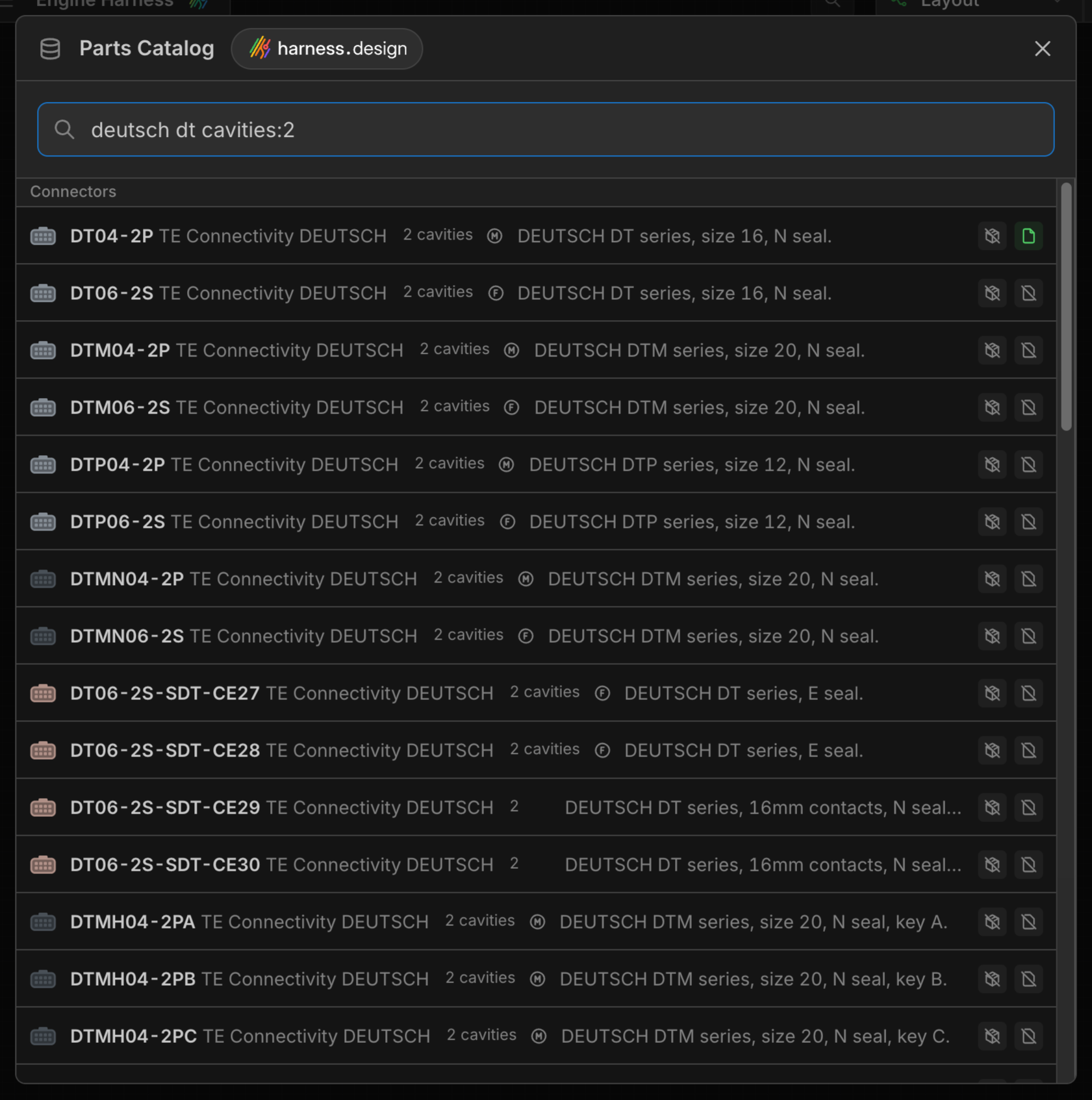
The Parts Catalog is a library of real manufacturing parts maintained by harness.design: connectors, contacts, cavity plugs, terminals, wires, cables, splices, coverings and connector accessories from common manufacturers. Search it and add a part to a Part Library or to the open harness with one click, complete with its properties, cavity designations and, for many parts, an image.
The Parts Catalog is available to signed-in users on every plan.
Opening the Parts Catalog
- Click the Parts Catalog button at the bottom left of the Parts view or the Parts Library window.
- Open Main Menu → Parts catalog.
- Press the
Kkey. - When assigning a part to a component, choose Search parts catalog at the bottom of the part dropdown. The catalog opens with your search pre-filled, and each matching part gets an Assign button that assigns it straight to the component.
Searching
Type a part number, keyword or property into the search bar. Results are grouped by part type, with the most relevant parts first.
Narrow a search with filter:value terms. Every term must match, and values with spaces need quotes, for example manufacturer:"TE Connectivity". Click View search filters to see the list in the app.
| Filter | Matches | Example |
|---|---|---|
manufacturer | Manufacturer | manufacturer:Deutsch |
type | Part type or style, e.g. ring terminals or heat shrink | type:connector |
compatible | Parts compatible with a part number | compatible:DT04-2P |
cavities | Number of connector cavities | cavities:3 |
gender | Connector or contact gender | gender:female |
shell | Connectors with a shell only | shell |
color | Part, wire or cable core color | color:red |
stripe | Wire stripe color | stripe:white |
gauge | Wire gauge, or a gauge a part accepts | gauge:20awg |
cores | Number of cable cores | cores:4 |
shielded | Shielded cables only | shielded |
size | Terminal size or stud | size:M5 |
voltage | Diode voltage rating | voltage:600V |
current | Diode current rating | current:3A |
resistance | Resistor resistance | resistance:120ohm |
power | Resistor power rating | power:0.5W |
Other part properties can be filtered the same way, even ones not listed here. The search bar suggests filter names as you type, and values for filters with a fixed set of options such as manufacturers, part types, genders and colors.
Compatible Parts
Use the compatible: filter to find the parts that go with a connector, such as its contacts, locks, seals and mounts. When you pick an accessory for a connector that already has a part assigned, for example the Contact in a connector configuration or the part for a single cavity, Search parts catalog pre-fills compatible: with the connector’s part number so only matching parts are listed.
Viewing a Part
left-double-click a part, or right-click it and select View, to open its details. Catalog parts are read-only, but you can add them to your library or harness from the details window.
Adding Parts
Each part shows two buttons, one for the part library and one for the open harness. The library button adds to the library currently selected in the Parts Library window (it is hidden while that library is read-only), and the tooltip names it:
- / Not added -
left-clickto add the part. - / Added - a part with this part number already exists and matches the catalog.
- / Different details - a part with this part number exists but differs from the catalog. Click Update to overwrite its properties with the catalog’s.
Updating a part from the catalog keeps the fields that are yours: connector configurations, cavity seals, prices, your internal part number, and your description when the catalog part has none.
To add several parts at once, select them with shift or ctrl/cmd left-click, then right-click and choose Add to the library or the harness.
Parts are matched by part number, so a catalog part and a part you created yourself with the same part number are treated as the same part. See Part Syncing.
Missing or Incorrect Parts
- Suggest a part - shown when the catalog is empty or has no results for your search. Tell us which part you were looking for and we’ll consider adding it.
- Report incorrect data - in a part’s details, lets you tell us what’s wrong with a part so we can fix it.
- Create custom part - when nothing matches, create the part yourself in your library or harness instead.